
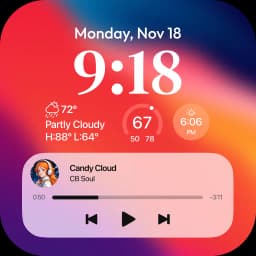
Captures d'écran
À propos de Lock Screen OS
Lock Screen OS transforme votre appareil Android avec un remplacement personnalisable de l'écran de verrouillage qui met en avant votre contenu et vos informations préférés.
Réinventer votre expérience d'écran de verrouillage commence par un contrôle créatif total. Personnalisez votre écran de verrouillage avec des polices sur mesure, affichez des widgets pour des informations en un coup d'œil, et présentez vos photos préférées en arrière-plan. Dépassez l'écran de verrouillage standard d'Android et créez une interface visuelle qui reflète votre style.
Basculez instantanément entre plusieurs designs d'écran de verrouillage. Créez différents écrans de verrouillage avec des fonds d'écran et des styles uniques, puis alternez entre eux selon votre humeur ou votre routine quotidienne. Parcourez une galerie de fonds d'écran organisés en collections thématiques, ou puisez dans votre propre bibliothèque de photos pour une inspiration instantanée.
Restez informé sans déverrouiller votre appareil. Affichez les notifications entrantes en vue de liste étendue, en vue compacte empilée, ou masquez-les complètement—vous contrôlez la quantité d'informations affichées sur votre écran de verrouillage. L'accès à l'appareil photo même verrouillé vous permet de capturer des moments instantanément. Les notifications d'appels téléphoniques apparaissent sans nécessiter de déverrouillage, vous permettant de répondre ou de rejeter rapidement les appels.
La configuration est simple. Accordez les autorisations requises lors de l'installation initiale : accès à l'appareil photo pour la capture rapide de photos, surveillance de l'état du téléphone pour les notifications d'appels, accès aux notifications pour afficher les alertes, autorisations de stockage pour la gestion des fonds d'écran, et services d'accessibilité pour activer l'affichage de l'écran de verrouillage. Une fois configuré, vous pouvez définir un code d'accès personnalisé pour sécuriser votre appareil et choisir si les notifications système apparaissent aux côtés de votre écran de verrouillage personnalisé.
Lock Screen OS offre aux utilisateurs Android une alternative puissante à l'écran de verrouillage par défaut, combinant personnalisation visuelle, informations pratiques via widgets et gestion des notifications. Téléchargez l'application dès aujourd'hui et transformez votre façon d'interagir avec votre appareil dès que vous le réveillez.
Avantages et inconvénients
Avantages
- Customize lock screen with fonts, widgets, and personal photos
- Switch between multiple lock screen designs instantly
- View notifications and answer calls without unlocking device
- Quick camera access from lock screen to capture moments
Inconvénients
- Requires camera, notification, storage, and accessibility permissions
- Custom passcode setup needed in addition to device lock
- Accessibility service access grants broad control over your device
- Notification display options may duplicate Android system notifications
Questions fréquentes sur Lock Screen OS
Lock Screen OS est-il sûr à télécharger ?
Aucun rapport d'analyse antimalware n'est encore disponible sur Unstore pour cette version de Lock Screen OS. N'installez que des fichiers provenant de sources fiables et laissez la protection de sécurité de votre appareil activée.
Quelle est la configuration requise pour Lock Screen OS ?
Lock Screen OS fonctionne sous Android. La taille du téléchargement est de 39.4 MB.
Quelle est la dernière version de Lock Screen OS ?
La dernière version de Lock Screen OS sur Unstore est la 4.0.7. Sa dernière mise à jour date du 10 août 2026.
Qui développe Lock Screen OS ?
Lock Screen OS est développé par Apps Genz.
Apps similaires

Microsoft PowerToys
Utilitaires Windows et outils de productivité — améliorez votre flux de travail avec des outils système, la gestion des fenêtres et l'aperçu des fichiers.

Windows Essentials 2012
E-mail, messagerie, retouche photo, création vidéo et stockage cloud — Windows Essentials 2012 inclut tous les outils de productivité dont vous avez besoin.

Free Download Manager
Gestionnaire de téléchargement qui accélère les transferts, organise les fichiers par type et se synchronise avec Firefox et Chrome.

HWiNFO
Surveillance matérielle pour Windows : température CPU, charge GPU, vitesse des ventilateurs et voltage en temps réel.

TransMac
Lisez les lecteurs Mac et fichiers DMG sous Windows. Accédez au stockage APFS/HFS+ et créez des images disque.

TestDisk & PhotoRec
Récupérez les fichiers perdus et réparez les partitions de disque — outil de récupération de données gratuit et open-source pour Windows.
Derniers articles

Tableau blanc gratuit en ligne comme Jamboard : utilisez Quickboard dans votre navigateur, sans inscription
Oct 6, 2026

Jouez à un jeu gratuit dans le style d'Alto's Adventure dans votre navigateur (pas de téléchargement)
Oct 6, 2026

Jouez à un jeu de puzzle Color Ball Sort gratuit dans votre navigateur (sans téléchargement)
Oct 6, 2026

Jouez à un jeu de course de buggy gratuit style Beach Buggy Racing dans votre navigateur (sans téléchargement)
Oct 6, 2026

Convertisseur gratuit de chiffres romains en ligne : instantané, sans inscription, fonctionne sur votre téléphone
Oct 6, 2026